AI & ML

How to Incorporate AI into Your Business Today

By
Joel Passen
April 26, 2023
5 min read

What is AI for business?

AI is not a fad. It’s the news. It dominates the talk of every business conference. And it is the number 1 topic of countless leadership meetings. CEOs are challenging their teams to leverage AI in every facet of their businesses to increase their productivity. gain deeper insights into user behavior, automate mundane tasks, and drive deeper insights with which to make critical decisions. It’s here. The big question is: How can you use it in your business right now?

GPT has catapulted AI into the spotlight, but does it translate into measurable productivity and revenue gains? A recent study by the  National Bureau of Economic Research suggests that even in these early innings of AI for business, it’s moving the needle for early adopters.The study’s authors, Erik Brynjolfsson, Danielle Li Lindsey, and R. Raymond, concluded that AI “disseminates the potentially tacit knowledge of more able workers and helps newer workers move down the experience curve.” Our takeaway from the study is that AI is already helping humans do things faster with often better results.

AI provides businesses with numerous automation opportunities, which can help save time and money while increasing accuracy at the same time. Automation technologies such as natural language processing allow machines to interpret human speech or text input without any manual intervention required from humans. This eliminates tedious data entry tasks from employees’ workflows so they can focus their energy on higher-value activities. According to a recent Zapier study, “76% of respondents said they spend 1 - 3 hours a day simply moving data from one place to another. Additionally, 73% of workers spend 1 - 3 hours trying to find information or a particular document.” Additionally, automated processes reduce errors due to human factors like fatigue or distraction, which could otherwise lead to costly mistakes. The same Zapier study confirms this, arguing that “83% of workers said they spend 1 - 3 hours a day fixing errors.” That’s a full workday moving data around, looking for information, and fixing human errors. Imagine what you or your team could do with their day if that were a thing of the past.

The fact is that your company will never generate less data than it does now. The issue is that traditionally, 90% of data generated and collected by businesses is dark—untapped, and often completely unknown. Thanks to applied AI, companies can now use advanced algorithms to easily analyze large unstructured data sets, allowing them to understand consumer and customer behaviors better. This application spans the organization from marketing to engineering, product to customer experience, business intelligence to RevOps, etc. Imagine if these teams had their very own AI teammate that organized every interaction with your prospects and customers and turned it into knowledge and insights to help make everyone’s job easier. Now that’s possible with AI. 

Harness the power of AI today. Simple, smart, and safe.

On a more grounded note, AI will have growing pains along the way. It has problems of its own, especially for businesses that need to leverage it to stay competitive. 

It’s clear that adopting AI is no longer a question of “if” but “when.” It’s an opportunity facing every leader in every industry. And as we confirmed in our research for this report, there are huge incentives to move quickly. But before you leap into AI-powered solutions for your business, you must evaluate them properly—not only from a technical standpoint but also from a functional perspective.

Let’s be honest, millions of dollars will be wasted trying to “roll your own” AI. Before attempting a bespoke AI project, it is important to understand the challenges.

Cross-modal data integration

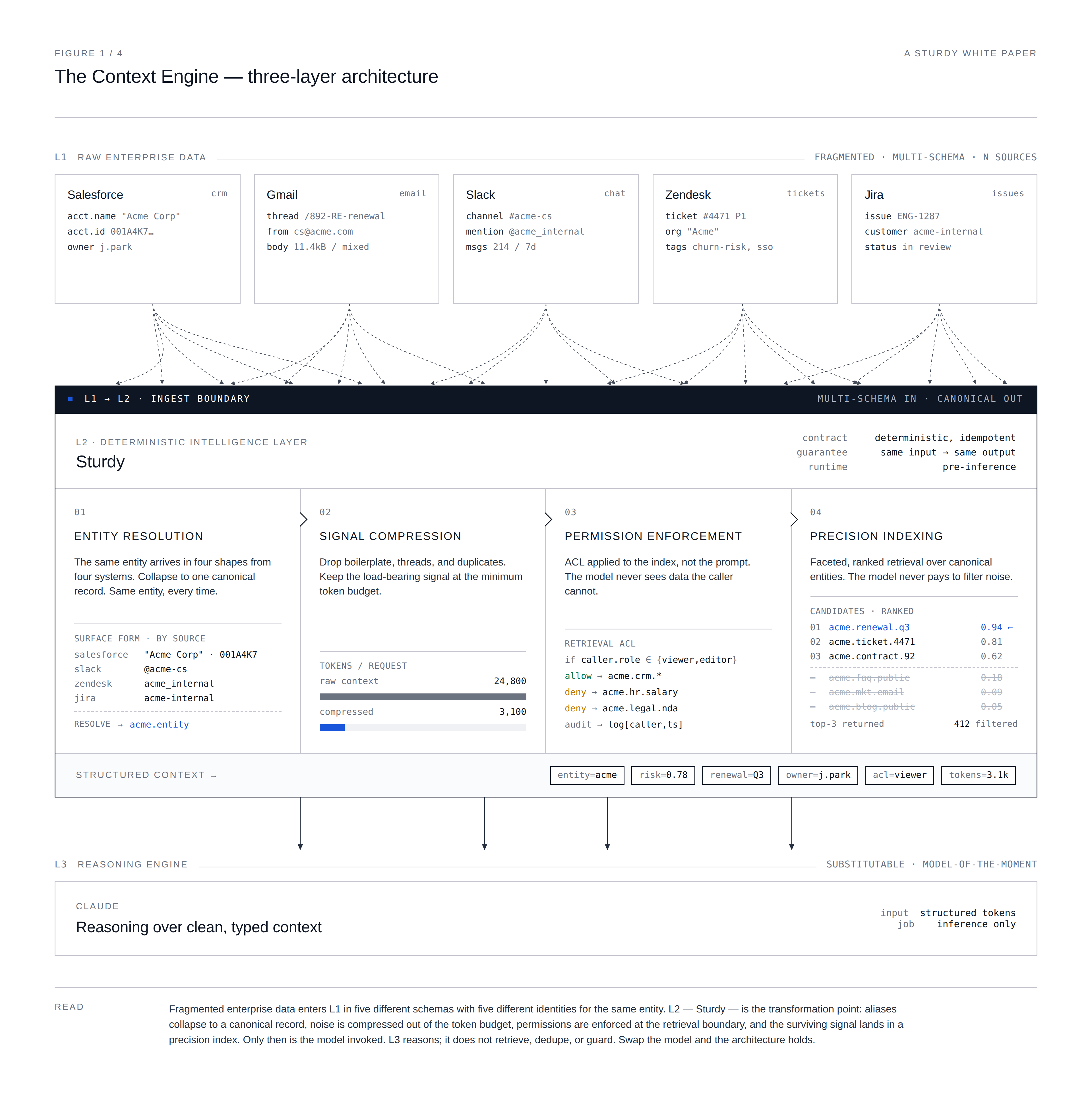
Cross-modal data integration refers to the process of combining and analyzing data from different modalities or sources, such as email, voice, chat, CRM data, ticketing data, and more. This is one of the biggest blockers for teams trying to build their own AI solutions. Cross-modal data integration aims to extract meaningful insights and knowledge from diverse data sources that may provide complementary or redundant information.

Cross-modal data integration involves several steps, including data preprocessing, feature extraction, alignment, and fusion, or what we call data joining. During data preprocessing, the data from each modality is cleaned, standardized, and prepared for the AI to analyze. Feature extraction involves extracting relevant features or characteristics from each modality, such as text features. Alignment involves mapping the features from each modality onto a common feature space, which enables them to be compared and combined. Finally, fusion involves combining the features from each modality to generate a unified representation of the data. 

​​Cross-modal data integration is integral for AI for Business. For example, when you want to know the most commonly requested feature for a specific cohort of your customers, you need to combine data from multiple inboxes, systems, your CRM, and other modalities to provide a comprehensive and accurate answer.

Data cleansing and normalization

Data cleansing and normalization are critical steps in preparing data for AI applications. In simple terms—garbage in, garbage out. They are also insanely laborious. AI algorithms rely on accurate and reliable data to make predictions or generate insights. Data cleansing and normalization are critical to ensure the data used to train AI models is accurate, consistent, and complete. Think of it this way, you can improve the performance of AI algorithms by reducing noise like duplicate data and other inconsistencies. This can help AI models to make more accurate and reliable predictions. And cleaning and re-structuring data helps to make AI models more interpretable by reducing the complexity and variability of the data. This can help identify the most important features or variables driving the predictions or insights generated by AI models.

One of the most common reasons AI projects fail is due to data cleaning and normalization or, rather, the lack thereof. Business data can come in different formats, such as email, tickets, call transcripts, and more, each with unique characteristics and challenges. Normalizing and cleansing data across these different modalities is a complex task. Now consider that the amount of business data available for analysis is growing rapidly, making it difficult to manage and process data efficiently. This can be particularly challenging when cleansing and normalizing data, which can be time-consuming and computationally intensive.

To compound matters even more, business data is always stored in different systems or databases, which are infrequently compatible with each other. Just think how many different people are emailing your customers. Daunting.

Data cleansing and normalization are important but challenging steps in preparing data for AI applications. It requires domain expertise, technical skills, and a deep understanding of the data and the business problem.

User interface

Let’s say you can get clean, structured data into an AI or large language model. Now what? Now you need a user interface (UI), so business people can inform decisions and workflows with AI-generated insights. This isn’t trivial. You’ll need another team of developers because the people cleaning and preparing the data aren’t the same people who will build an end-user UI. Now you need to build some more software.

A well-designed UI helps users understand an AI system’s capabilities and benefits and increase their willingness to adopt and use it. The UI communicates the outputs and insights generated by the AI system in a way that is easy to understand and interpret. The UI can provide a way for users to input data, provide feedback, or customize the AI system to their needs. This can help improve the AI system’s accuracy and relevance and increase user value.

Data permissions

What next? Sigh. Don’t forget about data permissions. You are going to need them.

Data permissions refer to the rights and permissions required to access and use the outputs from your AI project. They are a critical component of data governance and must ensure that data is accessed per your organization’s policies. Think of this as who can see and use what.

Depending on the nature of the business and the data being used in the AI project, there will likely be requirements around data access and use. Ensuring that the AI project has appropriate data permissions can help to ensure compliance with relevant laws and regulations, such as data protection laws like GDPR.

Simply put, you must build more software to manage who can see what. Data permissions are often reviewed and updated to ensure ongoing compliance with and changing business needs, so your permissioning software has to be commercial grade.

Automations and exhaust

Insights from operational AI systems involve integrating AI models and insights into existing business processes and systems. You must get AI-generated insights to the humans and systems needing the knowledge. This may involve building APIs that allow the model to be called from other applications or systems or integrating the model into your teams’ existing tools like your CRM, email, etc.

Once the AI model is integrated, you have to automate the generation of insights. This may involve setting up automated alerts or reports triggered based on specific events or data conditions or integrating the insights into a dashboard that provides real-time insights (data UI).

By automating insights from AI systems, businesses can gain real-time, actionable insights that can inform decision-making and drive business outcomes. Automating insights can also help improve businesses’ process efficiency and effectiveness by reducing the need for manual analysis and decision-making. Vernon Howard, Co-Founder & CEO at Hallo, exclaims that with AI,

I can automate 20 to 30% of my work now.”

The takeaway is that if you can generate insights, you must autonomously get them to the right place.

Integration requirements

One of the main failure points for AI-related projects is unsustainable methods of extracting and converting data. In the past, this was done manually by interns, business analysts, and data engineers. Technological advancements like APIs make modern data capture processes instantaneously and consistently. This frees data and BI professionals from arduous entry work, focusing their efforts on more rewarding, core business responsibilities.

When selecting any technology solution, it’s important to ensure that it has integration APIs (Application Programming Interfaces) to enable seamless integration with your other systems and applications. Integration APIs allow different software applications to communicate with each other, exchange data, and perform tasks without the need for manual intervention.

Ideally, look for solutions that build direct integrations to platforms instead of using third-party integration platforms. Third-party platforms offer a fast way to connect systems but often lack configurability and data classification controls. Also adding a third-party data integration solution can also introduce another data processor to consider.

Data privacy

The subject matter experts we interviewed for this report agree that privacy concerns are the number one reason AI initiatives fail to launch. Xiaoze Jin, the Lead AI/ML Solution Architect at Rackspace Technology, states,

We’re in a very early inning of cloud AI as a SaaS offering. Privacy, above all else, is most important. Beyond privacy lies responsible AI/ethics, federated learning, and zero-trust framework security.”

Due to privacy concerns and stringent compliance regulations, functional leaders are often stymied by infosec and privacy teams reluctant to allow access to collect or process user data, preventing them from taking full advantage of AI-driven insights. Yacov Salomon, Founder & Chief Innovation Officer at Ketch, states,

Be aware of privacy, the ethical use of data, and the governance of data.”

He continues,

...the world is evolving, and if ML and AI are involved, you need to scrutinize. Governing around data makes a big difference.”

Data privacy laws are designed to protect individuals’ privacy and personally identifiable information (PII). PII refers to any data or information that can be used to identify a specific individual, directly or indirectly. PII can include any information that can be used to identify an individual, such as their name, email address, social security number, phone number, home address, date of birth, driver’s license number, passport number, biometric data, or any other unique identifier.

Any commercial AI solution should have a detailed and thorough approach to privacy. Ask for a copy. Otherwise, look for solutions that automatically de-identify data. The de-identification process can involve removing or masking certain data elements, such as names or addresses. Of course, there are different levels of de-identification, ranging from removing obvious identifiers to more advanced techniques that involve complex algorithms and statistical analysis. The effectiveness of de-identification methods depends on the type of data being processed and the acceptable re-identification risk threshold. Patricia Thaine, Co-Founder & CEO at Private AI, argues,

The easiest thing to do is remove PII as early as possible in the pipeline... At ingest or as soon as you possibly can in your system in order to minimize risk.”

Pro Tip: Sending customer data that includes PII to large language models (LLMs) like ChatGPT is a bad idea and will likely compromise user and confidentiality agreements with your customers.

Security

AI solutions may require access to sensitive data. Ensure that any solution provider maintains a comprehensive Information Security Management program to manage Sturdy’s systems and products’ security, availability, confidentiality, integrity, and privacy risks. The vendor’s program must be independently audited and certified to meet the requirements of Trust Services Criteria SOC2 Type II. You’ll also want to ensure that all data communications into and out of a platform are encrypted-in-transit. That data is stored encrypted-at-rest using industry-standard encryption mechanisms.

Any solution vendor should have a current SOC 2 Type II for your team to review. This is the most comprehensive SOC protocol and attests not only to the suitability of a vendor’s processes and systems but their operational effectiveness of sticking to those controls over a period of time.

Considering these technical requirements when evaluating AI solutions, you can ensure that the solution is compatible with your existing infrastructure and meets your performance needs.

AI is the future wave, and those who do not embrace this ever-evolving technology in their business are already falling behind. Jin argues,

We’ve already begun to see the paradigm shift, creating a new way of living and working with AI as a co-pilot... And yet, we’re still living in the wild west of AI, with land-grabbing occurring left and right.”

Those who do understand the immense power that AI can begin to automate processes, secure insights and increase customer engagement across multiple channels reap immeasurable rewards. As a CEO and business owner, Howard exclaims,

This is a big deal... this is huge.”

Unsurprisingly, AI has become one of the most aggressive sectors in business today. Still, fortunately, there are now plenty of resources and expert advice on how to safely and successfully deploy AI into your company. It’s time to get ahead of the competition and take advantage of this revolutionary force before it zooms us into an entirely new world of business opportunities!

Similar articles

View all

What Is a QBR? (And Why Most of Them Are Broken)

Alex Atkins
January 15, 2026
5 min read

Quarterly Business Reviews (QBRs) were invented with good intentions: get out of the weeds, meet with your customer, and align on outcomes every quarter.

In practice? Many QBRs have become 40-slide product monologues that take weeks to build, bore executives, and don’t change much of anything.

As Aaron Thompson argues in his widely shared post “QBRs are Stupid” [1], the traditional way we do QBRs is often more about checking a box than driving real business value. But when done right—and when modern tools are involved—a QBR (or more broadly, an “Executive Business Review”) can still be one of the highest leverage motions in Customer Success, Sales, and Account Management.

This post breaks down:

  • What a QBR is (and what it’s supposed to be)
  • Who uses QBRs and why they matter
  • The traditional steps to creating a QBR
  • How QBRs are evolving (less “quarterly,” more “business review”)
  • How Sturdy.ai can run QBRs for any account in seconds—not hours or days

What Is a QBR?

A Quarterly Business Review (QBR) is a structured, typically executive-level meeting between a vendor and a customer to:

  • Review business outcomes and value delivered
  • Align on goals, strategy, and risks
  • Agree on a plan for the next period (not always a quarter anymore)

Unlike a status meeting, a QBR is supposed to focus on outcomes, strategy, and impact, not tickets, small features, or sprint updates.

Industry bodies like TSIA (Technology & Services Industry Association) and customer success leaders (e.g., Gainsight, Winning by Design) have consistently emphasized that effective business reviews should be outcome-based, data-backed, and jointly owned by vendor and customer [2][3].

Who Are QBRs For?

QBRs are heavily used across:

  1. Customer Success (CS) / Account Management (AM)  
    • To prove ongoing value
    • Reduce churn and expand accounts
    • Align on adoption, usage, and business outcomes
  2. Sales / Strategic Accounts / Customer Directors  
    • To maintain executive relationships
    • Surface expansion opportunities
    • Show roadmap alignment to strategic initiatives
  3. Professional Services / Consulting / Agencies  
    • To connect deliverables to business impact
    • Discuss ROI, timeline, and next phases
    • Reset expectations where needed
  4. Product & Executive Teams  
    • To hear voice-of-customer at the highest level
    • Validate product direction with strategic accounts
    • Identify common themes and risks across the portfolio

In modern SaaS and B2B, QBRs have shifted from a “CS-only” ritual to a cross-functional motion that spans CS, Sales, Product, and Leadership [4].

Why QBRs Matter (When They’re Done Right)

When they’re not just slidedecks for slidedeck’s sake, QBRs can:

  • Prove value
    Tie your product directly to metrics your customer’s executives care about: revenue, cost savings, risk reduction, NPS, time-to-value.
  • Protect and grow revenue
    Well-run business reviews correlate with higher renewal and expansion rates because they build trust and keep your solution aligned with evolving needs [2][5].
  • Align on strategy and roadmap
    They create formal space to talk about: “Where is your business going?” and “How does our roadmap support that?”
  • Surface risk early
    Adoption gaps, champion turnover, budget changes—QBRs are where these get raised and addressed proactively.

The problem is not the idea of a QBR; it’s the way traditional QBRs are executed.

The Traditional QBR: Steps, and Where They Go Wrong

Let’s walk through the typical (old-school) QBR workflow and why it’s so painful.

Step 1: Define Objectives and Audience

What’s supposed to happen:

  • Clarify the purpose of the review:
    • Renewal risk?
    • Proving ROI?
    • Expansion discussion?
    • Strategic alignment with a new initiative?
  • Confirm who will attend: executive sponsors, day-to-day users, procurement, etc.
  • Tailor the content to those people, not a generic template.

Why it matters:
McKinsey and Gartner both emphasize executive conversations that center on the customer’s business priorities, not your internal agenda [5][6]. If you don’t decide the objective and audience upfront, you end up with a “kitchen sink” deck that satisfies no one.

Where it goes wrong:
Teams often skip this step and reuse the same template for every account, regardless of size, segment, or lifecycle stage.

Step 2: Gather Data (Usage, Outcomes, Support, Voice-of-Customer)

What’s supposed to happen:

  • Pull product usage data (logins, key feature adoption, utilization vs. license)
  • Capture business outcomes (KPIs, ROI estimates, improved cycle times, etc.)
  • Summarize support data (tickets, escalations, time-to-resolution)
  • Incorporate voice-of-customer: NPS, CSAT, survey results, call notes, emails

Why it matters:
Data-backed QBRs are more credible and effective. TSIA’s research on outcome-based engagement models shows that value evidence (data plus narrative) is a core driver of renewal and expansion [2].

Where it goes wrong:

  • Data is scattered across CRM, helpdesk, product analytics, call recordings, Slack, and email
  • CSMs or AMs spend hours to days cobbling it together manually
  • Important context (like that frustrated email from the VP last month) gets missed because it lives outside the “official” systems

Step 3: Build the QBR Deck

What’s supposed to happen:

A concise, outcome-focused structure such as:

  1. Executive Summary  
    • Key wins this period
    • Key risks and challenges
    • Recommended next steps
  2. Your Goals & Strategy  
    • Recap of the customer’s stated objectives
    • Any changes in their business (M&A, leadership, budget shifts)
  3. Value & Outcomes  
    • KPI trends
    • ROI or impact stories
    • Before/after comparisons where possible
  4. Adoption & Usage  
    • Feature adoption
    • Usage by segment/team
    • Gaps and opportunities
  5. Support & Experience  
    • Ticket trends
    • NPS/CSAT highlights
    • Themes from feedback
  6. Roadmap & Alignment  
    • Relevant roadmap items
    • How they map to the customer’s goals
  7. Joint Plan / Next 90 Days  
    • Clear action items, owners, and dates
    • Milestones for the next review

Why it matters:
This structure keeps the meeting focused on the customer’s business—not on an endless product tour. Gainsight and other CS thought leaders consistently recommend an “outcomes-first” format that leads with business results, not feature lists [3].

Where it goes wrong:

  • The deck is 40–60 slides of feature screenshots and charts
  • The story is missing: data with no narrative, or narrative with no data
  • It’s built from scratch every time, burning hours of CSM and AM bandwidth

Step 4: Internal Review and Alignment

What’s supposed to happen:

  • CS, Sales, and sometimes Product or Leadership review the QBR deck together
  • Align on:
    • Renewal / expansion posture
    • Risk areas to probe
    • Who will say what in the meeting

Why it matters:
Cross-functional alignment ahead of the call means you present a unified front. Research on strategic account management underscores the importance of coordinated communication across all vendor stakeholders [7].

Where it goes wrong:

  • Internal prep is rushed or skipped
  • Different people show up with different agendas
  • The customer experiences a fragmented, reactive conversation

Step 5: Run the Meeting

What’s supposed to happen:

  • Start with outcomes and their priorities, not your agenda
  • Spend more time on discussion than on presenting slides
  • Ask questions like:
    • “What’s changed in your business since we last met?”
    • “What would make this partnership a no-brainer for you next year?”
    • “Where are we falling short of expectations?”

Why it matters:
Harvard Business Review and other executive communication research shows that senior leaders want vendors to:  

  1. understand their business context, and
  2. co-create solutions, not just present information [6].

Where it goes wrong:

  • It’s a monologue; the vendor talks for 80–90% of the time
  • The “review” is mostly a product tour or roadmap dump
  • Action items are vague or never captured

Step 6: Follow-Up and Execution

What’s supposed to happen:

  • Share a succinct recap:
    • Decisions made
    • Action items, owners, and due dates
    • Updated success plan
  • Track progress and refer back to it in the next review

Why it matters:
Without follow-up, QBRs become “nice conversations” that don’t change outcomes. TSIA and Forrester both highlight the importance of codifying customer outcomes and success plans as part of a recurring cadence [2][8].

Where it goes wrong:

  • Notes live in someone’s notebook or a random doc
  • No shared source of truth for the success plan
  • The next QBR starts from scratch, again

How QBRs Are Evolving

Several trends are reshaping how leading teams approach QBRs:

1. From “Quarterly” to “Right Cadence”

Not every account needs a formal review every quarter. Many organizations now use:

  • Tiered cadences:  
    • Strategic: monthly / quarterly
    • Mid-market: 2–3x per year
    • Long-tail: automated or one-to-many reviews
  • Event-based reviews:  
    • Post-implementation
    • Pre-renewal
    • After major org or product changes

This aligns with best practices in scaled customer success, where engagement is driven by value moments and risk signals, not arbitrary calendar quarters [3][4].

2. From “Slide Deck” to “Shared Workspace”

Instead of a static PowerPoint, teams are moving toward:

  • Live dashboards (usage, outcomes, health)
  • Shared success plans (in CRM or CS platforms)
  • Collaborative docs with real-time notes and ownership

The review becomes a conversation anchored in live data, not a one-way presentation of stale screenshots.

3. From “CS-Only” to Cross-Functional

Sales, Product, and Leadership are increasingly:

  • Joining key business reviews
  • Using them to validate roadmap, gather voice-of-customer, and shape account strategy
  • Treating QBR artifacts as input into forecasting, product planning, and exec reporting

This shifts QBRs from a “CS ritual” to a company-wide motion for strategic accounts.

4. From Manual to AI-Accelerated

The most important evolution: how the QBR is created.

Instead of:

  • Manually pulling data from 6+ systems
  • Rebuilding decks from scratch
  • Hoping someone remembered that critical email or call

Organizations are now using AI and automation to:

  • Aggregate all customer interactions and signals
  • Summarize risks, opportunities, and sentiment
  • Auto-generate QBR-ready narratives and visuals

This is where tools like Sturdy.ai fundamentally change the game.

How Sturdy.ai Can Run QBRs for Any Account in Seconds

Traditional QBR prep can easily consume 5–10+ hours per account once you factor in:

  • Data gathering
  • Deck building
  • Internal alignment
  • Revisions

Multiply that across a CSM’s portfolio and it becomes obvious why QBRs either get skipped or watered down.

Sturdy.ai flips this on its head.

At a high level, Sturdy.ai:

  1. Ingests your real customer data  
    • Emails
    • Call transcripts
    • Support tickets
    • CRM notes
    • Product usage and other signals (where integrated)
  2. Understands what matters  
    • Themes and topics (requests, bugs, risk signals)
    • Sentiment and urgency
    • Stakeholder changes and escalation patterns
    • Outcome-related language (ROI, time savings, revenue impact, etc.)
  3. Auto-builds QBR-ready insights in seconds
    For any account, Sturdy.ai can surface:
    • What’s going well (wins, positive feedback, adoption signals)
    • What’s not (repeated complaints, unresolved issues, risk indicators)
    • Which outcomes you’ve actually helped drive
    • Concrete recommendations and action items for the next period
  4. Generates QBR artifacts instantly
    Instead of starting with a blank slide, you start with:
    • An executive summary tailored to that account
    • Key metrics and trends pulled from your systems
    • Highlighted quotes and examples from real interactions
    • A suggested agenda and next-steps section

What used to take hours or days of manual prep becomes a seconds-long operation:

“Run QBR for ACME Corp.”

…and you have a structured, account-specific review ready to refine and deliver.

Why This Matters for Modern CS, Sales, and Account Teams

When QBRs are no longer time-prohibitive:

  • You can run them for more accounts, not just the top 10%
  • You focus on quality of conversation, not on slide assembly
  • You capture real, holistic context, not just what’s in one system
  • You can standardize excellence, instead of relying on heroics from your best CSMs

Instead of asking, “Do we have time to do a QBR for this customer?”, the question becomes:

“Given we can generate a review in seconds, what’s the right cadence and format for this account?”

That’s the shift from QBRs-as-admin-work to QBRs-as-a-strategic-advantage.

Bringing It All Together

  • QBRs were created to align on outcomes, prove value, and co-create a plan—not to be product demos with extra steps.
  • Traditional QBRs are broken because they’re manual, generic, and often misaligned with what executives actually care about.
  • The fundamentals still matter: clear objectives, data-backed story, joint success plan, and strong follow-up.
  • QBRs are evolving toward flexible cadence, collaborative formats, cross-functional ownership, and heavy use of data and AI.
  • With Sturdy.ai, you can run QBRs for any account in seconds, pulling from the full reality of your customer interactions—not just the few metrics someone had time to find.

If you’re spending hours or days preparing for each QBR, you’re paying the “old tax” on a motion that no longer has to be that painful. The value of the QBR is in the conversation, not the manual labor behind the slides.

References

[1] Aaron Thompson, “QBRs are Stupid,” LinkedIn Pulse (discussion of common QBR pitfalls and how they fail to deliver real value).
[2] TSIA (Technology & Services Industry Association), research and best practices on outcome-based customer engagement and Customer Success motions.
[3] Gainsight, Customer Success thought leadership on Executive Business Reviews and outcome-focused customer engagement.
[4] Winning by Design and similar SaaS consulting frameworks on recurring value reviews and customer-centric cadences.
[5] McKinsey & Company, research on B2B customer value, account management, and executive engagement strategies.
[6] Harvard Business Review and Gartner, articles and research on effective executive conversations and strategic vendor relationships.
[7] Strategic account management literature and SAM programs that emphasize coordinated, cross-functional engagement with key customers.
[8] Forrester, research on customer lifecycle management and the importance of measurable, recurring value communication.

Customer Churn

The Most Dangerous Threat to CROs

Joel Passen
July 1, 2025
5 min read

The most dangerous threat to CROs doesn’t live in the opportunity pipeline.

It's churn.

  • It doesn’t scream like a missed quarterly pipeline goal.
  • It doesn’t show up in dashboards until it’s too late.
  • It's rarely caught by a generic 'health score'.
  • It's the board meeting killer.

Retaining and growing our customers is the only repeatable, compounding, capital-efficient growth lever left in B2B businesses.

📉 CAC is way up.

📉 Channels are saturated.

📉 Talent is expensive.

📉 Competition is fierce.

📉 Switching costs are low.

The path to $100M used to be “sell, sell, sell.”

Today? It’s “land, retain, expand.”

No matter how strong your sales motions are or how slick your product or service looks during the sales process, if your customers are churning, you’re stuck in a leaky bucket loop of doom.

Every net-new dollar you win is offset by dollars you lose. It's just math.

Yet most GTM orgs still operate like retention is someone else’s problem. "That's a CS thing."

  • The CS team might “own” the customer post-sale.
  • Account Management may own the renewal and growth number.
  • Support is in the foxhole on the front line.
  • RevOps might model churn with last quarter’s data.
  • Marketing might send an occasional newsletter via email.
  • Finance may be leaning in on the forecasting.
  • Product is building things that supposedly the customers want.

But in reality, churn is the CRO's problem. We wear it - or should.

If your go-to-market motion isn’t designed to protect and grow customers from Day 1, you’re not just leaving money on the table — you’re setting fire to it.

Retention and expansion aren’t back-end functions. They’re front-and-center revenue motions.

The most valuable work these days starts after the contract is signed — not before.

We need to stop treating post-live as a department and start treating it as the engine of durable growth.

Software

Have you heard this from your CEO?

Joel Passen
April 29, 2025
5 min read

"How are we using AI internally?"

The drumbeat is real. Boards are leaning in. Investors are leaning in. Yet, too many leaders hardly use it. Most CS teams? Still making excuses.

🤦🏼 "We’re not ready."Translation: We don't know where to start, so I'm waiting to run into someone who has done something with it.

🤦🏼 "We need cleaner data."Translation: We’re still hoping bad inputs from fractured processes will magically produce good outputs. Everyone's data is a sh*tshow. Trust me. 🤹🏼♂️ "We're playing with it."Translation: We have that one person messing with ChatGPT - experimenting.

😕 "Just don't have the resources right now."Translation: We're too overwhelmed manually building reports, wrangling renewals, and answering tickets forwarded by the support teams.

🫃🏼 "We've got too many tools."Translation: We’re overwhelmed by the tools we bought that created a bunch of silos and forced us into constant app-switching.

🤓 "Our IT team won't let us use AI."Translation: We’ve outsourced innovation to a risk-averse inbox.

It's time to put some cowboy under that hat 🤠 . No one’s asking you to rebuild the data warehouse or perform some sacred data ritual. You don’t need a PhD in AI.

You can start small.

Nearly every AI vendor has a way for you to try their wares without hiring a team of talking heads to perform unworldly 🧙🏼 acts of digital transformation.

Where to start.

✔️ Pick a use case that will give you a revenue boost or reveal something you didn't know about your customers.

✔️ Choose something that directs valuable work to the valuable people you've hired.

✔️ Pick something with outcomes that other teams can use.

Pro Tip: Your CEO doesn't care about chatbots, knowledgebase articles, or things that write emails to customers.

What do you have to lose? More customers? Your seat at the table?

Any Account. Any Question. Any Time.

Unlock Your Accounts